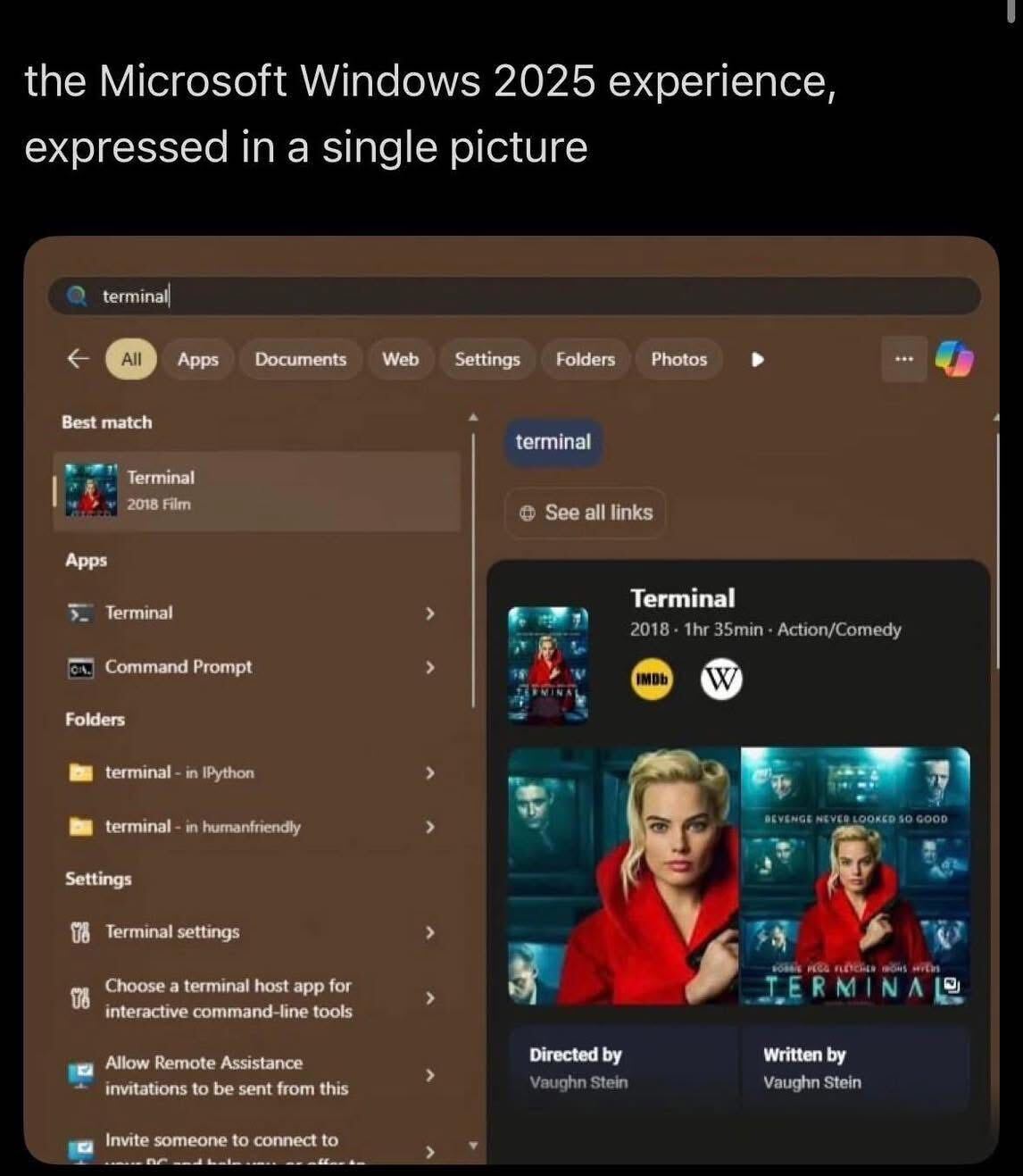
I always dug into RegEdit to disable this crap. And somehow, each time, it was a different series of steps.
Without these ads how will they fund copilot for 12 more minutes genius?
This is why I have a custom shell on my work PC. This is the kind of shit search interface where the local hits pop up quickly after you typed but then jump away to display irrelevant guff like this just as you’re clicking on what you wanted.
Litestep was the shit years and years ago!! Last I looked into replacing explorer with a custom shell, litestep was pretty abandoned. What shell are you using? Are there multiple options nowadays?
I didn’t think you could still get decent custom shells on Windows these days. What do you use?
What I do still have on my one Windows machine I need for a (staunchly annoying Windows only) company I do work for is a launcher program that I have been using for well over a decade. Super resource light and simple. I just don’t use the start menu at all.
It’s no longer meant to be used by computer savvy people. It’s meant for consumers. Literally. People that just consume and do not produce or think.
We are walking a different path now and need to say goodbye to windows and Microsoft.
At this point windows is just msys2 to me.
They paid people good money to design and crate that.
In an unmodified windows it would also show random tabloid news from MSN or affiliates inside the start menu…
sub office 365 for access to ms movie store.
Ok. So you type the correct name of the program. Cause terminal ain’t it. CMD and it opens fine.
Typing in powershell? How a about a bing search of Windows Power Settings? Not even the settings menu, just the fucking web search.
Types power
Windows search:
Best match
Sure thing, bud 😂
It even recognized the local app that matches, how on earth is this a better match
What is more infuriating is that they frequently don’t show the app / applet you are actually looking for until after they load a web result - which results in your muscle memory and just hitting enter working against you.
The sort order is Microsoft profits
It’s all relative. Best match for their user analytics. So they get good numbers to show user engagement in their board meetings.
Accidental clicks are engineered to juice those numbers too.
One pays MS per click.
I keep a small Win11 partition on my 2022 gaming laptop in case I need to take a cert exam or use a gov website, and I booted it for updating for the first time in 6 months. It took over 6 hours and 6 reboots to update! At one point, it was going bu-ding every minute from random notifications so I had to mute it.
Meanwhile, my 2012 Thinkpad T420 needed a full Fedora version upgrade, and that finished in 15 minutes.
No wonder MS is losing users
… You need Windows to use government websites? What kind of dystopian nightmare is this
This is still the case for many South Korean shits, tho these days you can also use a (Googled) Android or iOS device with some shitty app.
wait till you find out companies that operated in South Korea had to support Internet Explorer until 2020
Ha! Oh, if you think that’s dumb… There are certain key sections of the IRS website that only function during business hours. Imagine if more sites worked like that. “Dang, it’s after 5PM, gotta do my Amazon order tomorrow.
Honestly would be kind of great.
🤨
Serbia for example have it’s gov suit and drivers only for windows. You can’t login using your personal identification card on linux, afaik (like, even if you extract encrypted key from plastic card). Can’t even scan it to obtain profile pdf. They do have “consentid” app for android tho, that can be used to log in.
Russia also falls in same category, also they don’t have plastic cards for identification, only regular passport. Digital key (basically a regular encrypted cert) can be issued thru government department responsible for taxes and again, will only work on windows for login, due to required software. It should be possible to install certificate on linux, but to login on government site you will need to use browser in wine.
Dunno about other countries, only lived in those two. I heard some African countries also have same/similar system, don’t remember which one.
does wine or waydroid work for the serbia one?
Not knowing much about Serbian smartcards, but I had done quite a bit with smartcards in Linux before.
Have you seen this project? https://github.com/ubavic/bas-celik … looks to be cross-platform and do what you’re saying. Though you’d probably need pcscd, pcsc-tools, and possibly other similar packages, depending distro.
Wow, thank you. No, I was not aware of it, sounds like together with srb-id-pkcs11 it should do the trick, it will be wonderful to finally move my auth from windows vm.
Yes, smart card reader itself should work, the only problem is encryption of key on card and use of that key with website. That module mentioned above exactly the thing that required it seems.
Still, my point stands, cause project was created just two years ago and isn’t official in the first place. Unfortunately, government itself have no desire to support other platforms. :c
Ah if you want to use it on their website or in a browser you’ll probably also need a mini card driver like OpenSC.
And if you’re using firefox, you might have to go into settings to add a pkcs provider and tell it where
opensc-pkcs11.sois.There’s lots of generic info out there on smartcards in Linux if you were so inclined to “figure it out”…but I don’t blame them for not “supporting” Linux…that’s kind of a minefield.
Still, that’s the fun of Linux…realizing that “not supported” doesn’t mean it won’t work…just that they won’t help you.
yeah some government sites, regardless of what browser you’re using, think that you’re some “1337 Haxors” for using Linux Mint.
I use Qutebrowser on NixOS and sometimes it’s…yeah they don’t like that.
Can’t you trick it using a user agent switching? Been a long time since I’ve fucked with one so I forget it you can change OS on there.
I have a machine in my garage that gets used for music and the random football game. Starting it up after being down even a few weeks starts the churn of updates. It’s annoying.
Just in case you don’t know, unless it changed last time I checked, some organizations like Comptia didn’t allow computers with dual boot to be used to pass a cert exam.
I assure you my (virtual) machine only has windows on it.
Thinkpad is the tank of laptops.
tbf if you didn’t update fedora for 6 months you may aswell downlaod a new iso and they also do the windows reboot screens for no reason
On first glace I thought I’d be looking at the UI of a streaming service. This is so awful
Powertoys and that debloating scripts does wonders to make w11 usable.
Problem that powertoys are becoming bloated too. Before switching my 8gb RAM laptop to Linux, it was constantly swapping memory. I investigated and it was powertoys slowly eating everything. The two almost identical launchers, 300mb each. The eyedropper that you gonna use once a month 200mb, the help that comes out when you long press the windows key, another 80mb. Same for the screen ruler. Then the accent helper, and so on. My 8gb laptop only had 1 GB free Memory After a clean boot
AFAIK there was a memory leak in PowerToys. But it’s definitely ballooned in scope since it was first released. I suppose turning off the parts you don’t need would help but it really should still be more efficient. Doesn’t help that the Microsoft Department of AI Department seems to have started sinking its teeth into it as of the last few updates.
The last time I used the power toys was on W10 but can’t you choose which components you install? Surely you can disable the autostart for the ones you are not using?
Isn’t that the entire point of swap? If you’re only gonna access that memory once a month what’s wrong with it swapping to disk but becoming ready within seconds when you go to use it?
Dude, Windows swaps like it’s its job.
The job of swap is to be used after the RAM is full or is about to be full. It’s not to be used instead of the RAM.
I bet SSDs were a huge freaking performance boost for Windows generally speaking because of the way it swaps.
That’s not true. Linux by default also moves stuff to swap way earlier. Swap is not just a fallback when you run out of RAM. That is why I think Zram is the best. My system can swap as much as it wants to.
Linux swappiness is at least easier to configure + I haven’t really noticed it happen on anything with enough RAM to do the job it’s doing.
My 8 GB Thinkpad will swap quite a bit running PyCharm, docker and Firefox on KDE Plasma. My 32 GB desktop has near-zero swap usage and it has even more shit running at all
I’m currently dealing with an issue where on freshly installed Mint, after some time of me being away from the machine, the entire system and apps seem to have moved to the swap, which is on an hdd — so things slow down to a crawl and it takes like ten minutes to shake them back to life.
Edit: after some more troubleshooting, I’m not sure swap is the issue, but it’s still likely.
My Linux systems are all pretty RAM rich and almost never even touch swap.
That’s cool, but I’m more concerned as to why this happens while I’m away, when there’s no need for everything getting swapped while I’m at the machine.
Cries in ready boost
Yes but when it’s too much… The poor SSD in my 8gb laptop was constantly at 65°C because of all the activity. And it seems without reason. I would hear the warning sounds from crystaldiskinfo when “idle” in another room
Lol, I remember power toys from freaking tucows.com (it used to be a software repository of sorts) in the nineties.
Windows and power toys, two relics from the ICQ age.
the ICQ age
There’s a blast from the past. Uh oh!
Man, I think I still had an active Fark account more recently than I visited tucows but I remember it.
or when you speed type something and it just opens edge and searches bing for the app you tried to open